Short answer: Nintendo Switch 2 GameShare lets one Nintendo Switch 2 host share certain compatible games with other systems. For local wireless play, guests can use either Nintendo Switch or Nintendo Switch 2. For online sharing through GameChat, both the host and guests must use Nintendo Switch 2. Up to four Nintendo Switch or Nintendo Switch 2 systems can participate, but the exact game and connection method still matter.
This guide is based on Nintendo’s published GameShare information retrieved on September 19, 2026. It is research-based and does not claim hands-on testing, laboratory testing, benchmarks, or a comprehensive review of every supported title.
Which console can host GameShare?
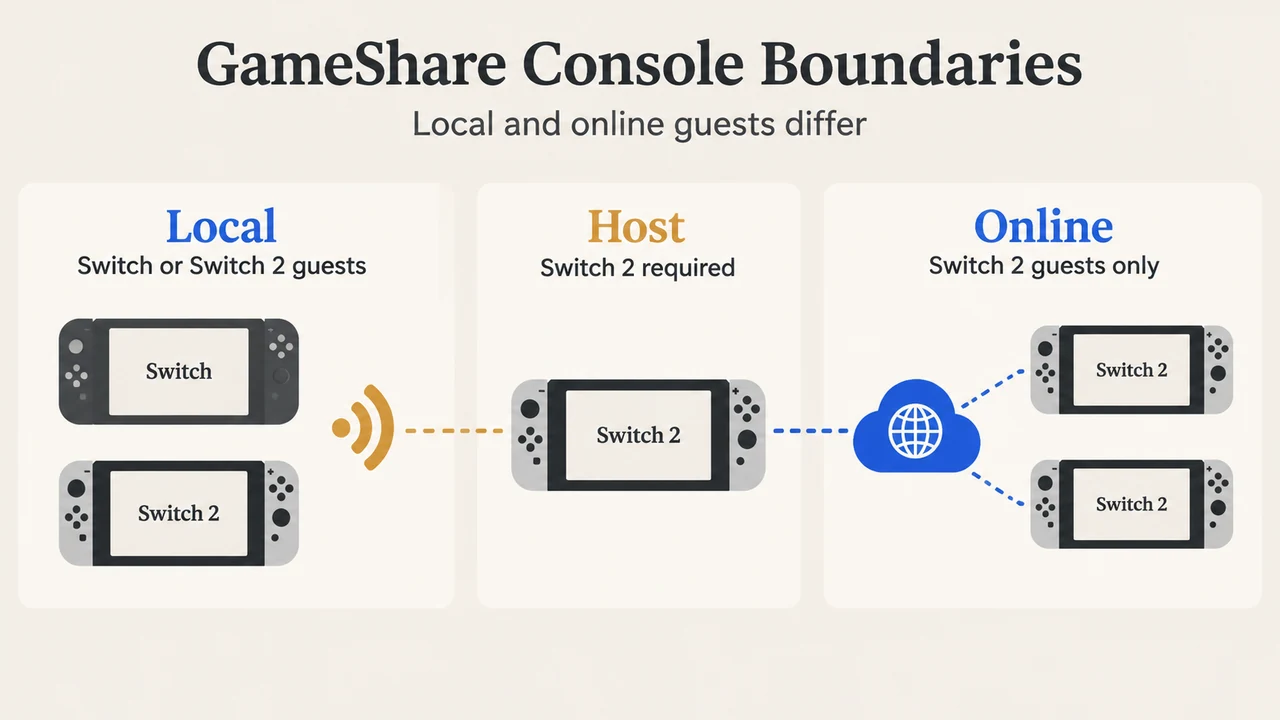
A Nintendo Switch 2 system and a game that supports GameShare are required to host a session. A regular Nintendo Switch system cannot start a GameShare session. It can only receive a compatible shared game through local wireless communication.
Nintendo describes the console boundary this way: Nintendo Switch 2 can share compatible games, while Nintendo Switch 2 and Nintendo Switch can receive them locally. Online GameShare is different: it is available through GameChat on Nintendo Switch 2, and Nintendo Switch systems cannot join online GameShare sessions.
Local versus online GameShare
| Connection | Host | Guest systems | Important limit |
|---|---|---|---|
| Local wireless | Nintendo Switch 2 | Nintendo Switch 2 or Nintendo Switch | The game must support GameShare. |
| Online through GameChat | Nintendo Switch 2 | Nintendo Switch 2 | The host and guests must be in a GameChat room together. |
For online sharing, a stable internet connection is required for GameChat. Nintendo also says delay can occur depending on the network environment and physical distance. That means GameShare does not promise the same experience as ordinary local play or a regular multiplayer mode.
How many systems can join?
Up to four Nintendo Switch 2 or Nintendo Switch systems can participate in one GameShare session. This is a session limit, not a statement that every compatible game supports four players through every connection method. Nintendo says developers decide whether to implement GameShare and how it works in their games.
Does every game work with GameShare?
No. GameShare only works with compatible games. Nintendo’s GameShare page lists featured compatible titles and identifies whether each supports local sharing, online sharing through GameChat, or both. The page was marked “Updated 1st September 2026” when the supplied evidence was retrieved.
The supplied list includes titles such as Pikmin 3 Deluxe, Star Fox, Pokémon Pokopia, Mario Tennis Fever, Kirby Air Riders, Donkey Kong Bananza, Super Mario Party Jamboree – Nintendo Switch 2 Edition + Jamboree TV, Clubhouse Games: 51 Worldwide Classics, and Super Mario Odyssey. These are examples from the supplied Nintendo page, not a claim that every game in a series is compatible.
Some games may support only one connection method. Some software may also be unsuitable for use with a Nintendo Switch system because it requires particular accessories or control schemes. Check the individual software information before planning a session.
Is the shared game the same as owning it?
No. GameShare provides access during the supported session; it does not turn the guest’s system into a permanent copy. For online GameShare, Nintendo says the receiving player can play only during the GameChat session in which the game was shared. Play ends when that session ends.
Nintendo also says that, after playing through GameShare, the software icon remains on the HOME Menu. A player can use it to reach the software information page in Nintendo eShop and learn more or purchase the full game. On Nintendo Switch, however, Nintendo says Nintendo Switch 2-exclusive software cannot be purchased there.
How GameShare differs from virtual game cards
GameShare and virtual game cards solve different problems. GameShare is a feature for sharing compatible software during a play session hosted by Nintendo Switch 2. A virtual game card is a Nintendo Account game-management feature. Nintendo says virtual game cards can be loaded on up to two systems paired with the account, and all users on a system can use a loaded virtual game card.
Nintendo also documents different virtual-game-card rules: a virtual game card can be played without an internet connection after it is loaded, while an online license requires an internet connection when opening the game. The same game cannot run at the same time on multiple systems through either virtual game cards or online licenses.
Those rules should not be used to predict GameShare behavior. GameShare has its own host, guest, connection, compatibility, and session limits.
What should you check before planning a session?
- Confirm that the game’s Nintendo software information says it supports GameShare.
- Choose local wireless if a Nintendo Switch system needs to join.
- Use Nintendo Switch 2 systems for online GameShare through GameChat.
- Check whether the title supports the connection method you plan to use.
- Keep the total at four participating systems or fewer.
- Check whether the game’s accessories or control scheme create an additional compatibility issue.
The exact steps for starting a session vary by game. Nintendo directs readers to its support guidance for “How to Start a Multiplayer Game” with the title of the game being played.
What the sources do not establish
The supplied sources do not establish that GameShare works with every multiplayer game, that every compatible title supports both local and online sharing, or that guests receive the same visual or control experience as owners. Nintendo says streamed image quality is reduced during GameShare, although the feature is designed to maintain image quality as much as possible. Save data behavior also varies by software: some save data may be created on a guest system for use with the full game.
This article uses the supplied Nintendo Singapore GameShare page, Nintendo’s Americas support FAQ, and the Nintendo US Switch 2 FAQ. The available evidence includes a current featured-title list and official console rules, but it does not provide a complete independent test of every listed title or every regional software page. No competing page was successfully fetched, so no competitor-coverage conclusion is made.
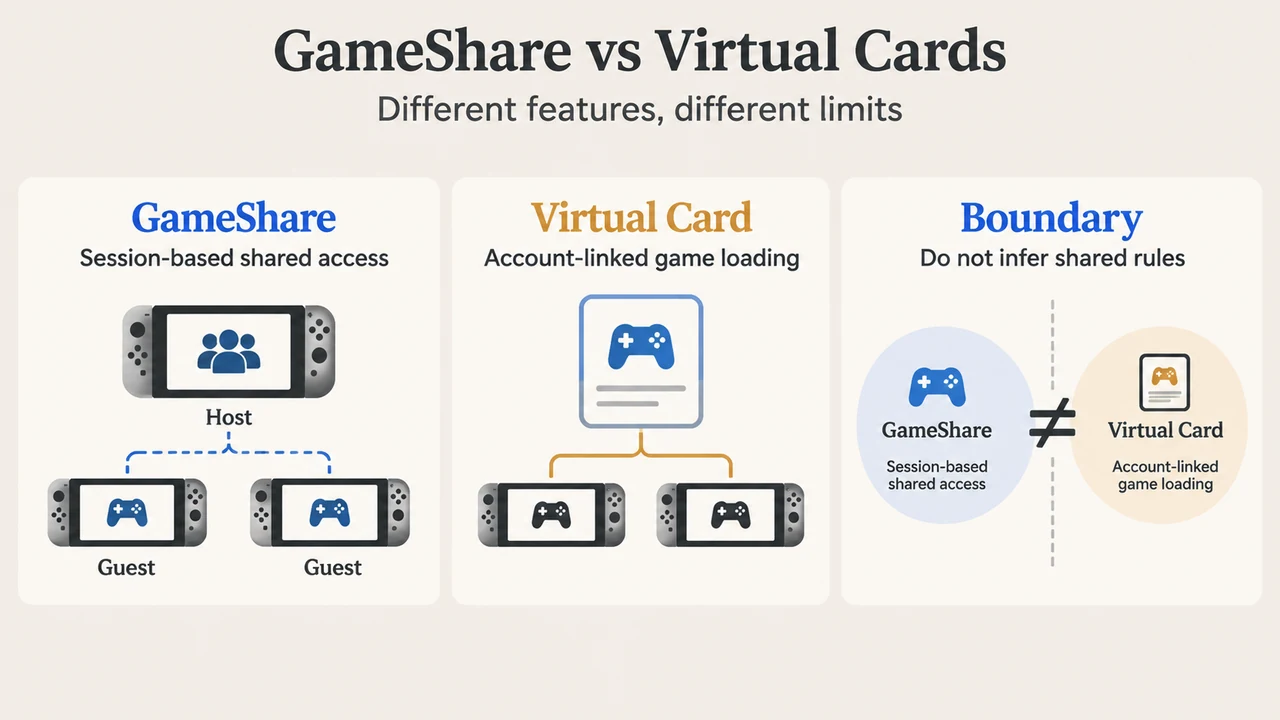
Text version of the diagrams
- GameShare Console Boundaries: Local — Switch or Switch 2 guests; Online — Switch 2 guests only; Host — Switch 2 required
- GameShare vs Virtual Cards: GameShare — Session-based shared access; Virtual Card — Account-linked game loading; Boundary — Do not infer shared rules