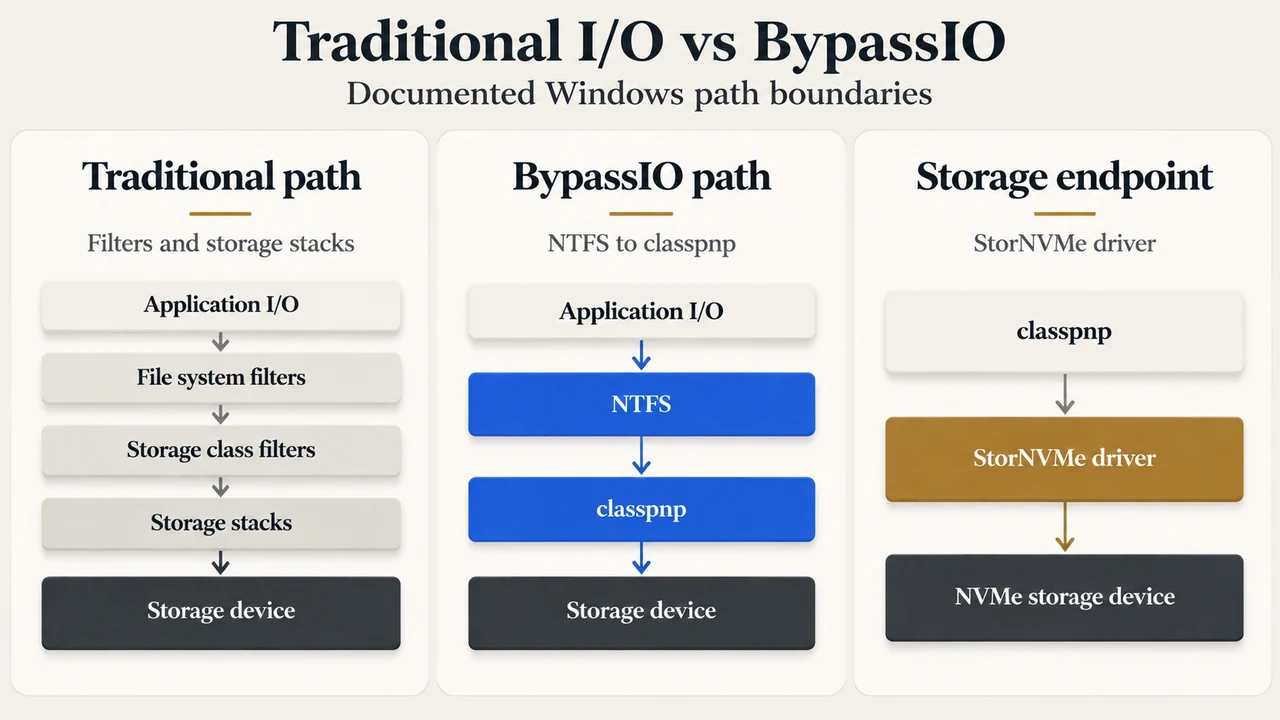
DirectStorage is an I/O API developed by Microsoft to introduce a new storage model for PC games. In conventional Windows storage processing, file reads traverse a file system filter stack, the file system, a volume filter stack, and a storage driver stack before reaching physical storage. DirectStorage pairs with operating system features such as BypassIO on Windows 11 and includes capabilities such as GDeflate GPU decompression in DirectStorage 1.1 to reduce CPU overhead and accelerate asset loading on supported configurations.
How BypassIO Operates in the Windows Kernel
BypassIO provides an optimized I/O path for reading from files, reducing CPU read overhead to support the demands of PC gaming. Starting in Windows 11, BypassIO is part of the infrastructure supporting DirectStorage.
BypassIO functions on an explicit per-handle basis. Requesting BypassIO applies exclusively to the designated file handle without altering other open handles to the same file. To coordinate support, Windows uses two diagnosable control codes:
FSCTL_MANAGE_BYPASS_IO: Processed by file system minifilters.IOCTL_STORAGE_MANAGE_BYPASS_IO: Sent by file systems to the volume and storage stacks.
Both control codes return the identity of any driver that failed a BypassIO request alongside the reason for vetoing it.
When an application issues an NtReadFile call on a fully BypassIO-enabled file handle, the operation bypasses the traditional multi-tiered filter hierarchy:
- The read request transfers directly from the I/O manager to the NTFS file system.
- From NTFS, the request flows directly to the disk driver (
classpnp). - The disk driver routes the request directly to the
StorNVMedriver.
During a fully enabled operation, the I/O skips all file system filters, all volume stack filters, and all storage stack filters and drivers residing above classpnp or situated between classpnp and StorNVMe.
If the file system filter stack supports BypassIO but the underlying volume or storage stacks do not, Windows operates in partial BypassIO. Under partial BypassIO, read I/O operations bypass the file system filter stack but continue through the conventional volume and storage stacks.
Documented Boundaries and Handle Rules for BypassIO
BypassIO operates within specific documented boundaries in Windows 11:
- Operating System: Supported strictly on Windows client systems. Support for Windows Server is deferred to a future release.
- Storage Technology: Supported exclusively on NVMe storage devices. Support for other storage technologies is planned for a future release.
- File System: Supported only on NTFS. Support for alternative file systems is planned for a future release.
- Operation Types: Supported exclusively for noncached reads on file handles. Noncached writes are deferred to a future release, and directory or volume handles are unsupported. Offload read and write operations are not affected by BypassIO.
- Special File Attributes: If a BypassIO-enabled file is marked sparse, operations revert to the traditional I/O path. Defragmenting an active BypassIO file redirects operations to the traditional path until defragmentation finishes, after which the handle resumes the BypassIO path.
- NTFS Resident Files and Security: A file resident in NTFS can enable BypassIO, but it traverses the traditional path while resident. Once a write causes the file to become nonresident, the system transitions to the BypassIO path. Enabling NTFS encryption on an active file pauses BypassIO. NTFS compression cannot be enabled on an active BypassIO file.
Operations across concurrent handles also govern execution state. If an application holds an active BypassIO handle (Handle A) and a concurrent handle (Handle B) is opened to perform cached or memory-mapped I/O, the system temporarily suspends BypassIO on Handle A. To avoid stale data, reads route through the traditional path until Handle B closes and all data sections and cache maps are torn down.
Diagnosing BypassIO Support with fsutil
Windows includes a command-line tool to query whether a volume, directory, or file path currently supports BypassIO. The utility issues an FSCTL_MANAGE_BYPASS_IO request specifying the FS_BPIO_OP_QUERY operation, returning the first driver blocking the feature along with its status reason.
The diagnostic syntax is:
fsutil bypassIo state /v <path>In this command, <path> represents a target volume, directory, or filename, while /v specifies optional verbose reporting.
For example, if an attached minifilter such as wof.sys has not opted into BypassIO support, querying the path produces a veto message:
BypassIo on "c:\" is not currently supported.
Status: 506 (At least one minifilter does not support bypass IO)
Driver: wof.sys
Reason: The specified minifilter does not support bypass IO.
If BitLocker encryption is enabled on the volume, running the verbose command illustrates partial BypassIO support:
BypassIo on "c:\" is partially supported
Volume stack bypass is disabled (fvevol.sys)
Status: 495 (The specified operation is not supported while encryption is enabled on the target object)
Reason: BitLocker Drive Encryption is enabled.
Storage Type: NVMe
Storage Driver: BypassIo compatible
Driver Name: stornvme.sys
DirectStorage GPU Decompression Architecture
DirectStorage 1.1 provides GDeflate GPU decompression to offload decompression tasks from the CPU. Data read by a single request is compressed in isolation, and game files can contain multiple streams.
A request is eligible for GPU decompression if its destination is a Direct3D 12 resource, specifically one of:
REQUEST_DESTINATION_BUFFERREQUEST_DESTINATION_TEXTURE_REGIONREQUEST_DESTINATION_MULTIPLE_SUBRESOURCESREQUEST_DESTINATION_TILES
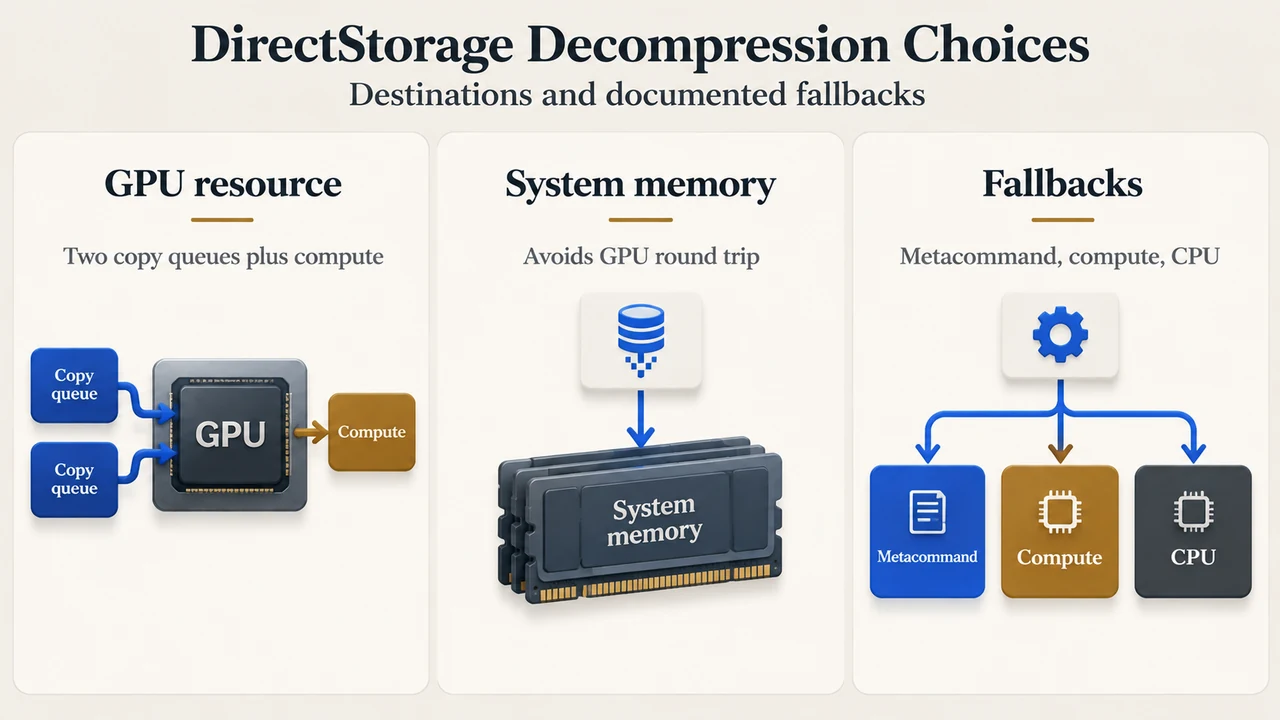
When decompressing to a GPU resource, DirectStorage creates and coordinates three queues:
- First Copy Queue: Copies the compressed stream from system memory to the GPU.
- Compute Queue: Executes decompression via hardware vendor metacommands or by dispatching the DirectCompute fallback implementation.
- Second Copy Queue: Copies the decompressed stream to the final destination resource.
Decompression runs in batches. GDeflate splits uncompressed streams into 64 KiB tiles, compressing each tile separately. Under the DirectCompute fallback, each wave works on one tile, employing a work-stealing scheme to process tiles across streams. Metacommand implementations from hardware vendors (such as AMD, Intel, and NVIDIA) optimize for high decompression bandwidth. If data is destined for system memory rather than a GPU resource, decompression avoids the overhead of transferring data to the GPU and reading it back.
Driver Support and Execution Configuration
- Hardware Requirements: GPU decompression is supported across DirectX 12 and Shader Model 6.0 compatible GPUs.
- Fallback Hierarchy: If a GPU driver lacks dedicated metacommands, DirectStorage falls back to DirectCompute. If the GPU or driver cannot run the DirectCompute fallback, DirectStorage decompresses on the CPU.
- CPU Threading and Custom Queues: Built-in CPU decompression uses a Windows threadpool. Developers can configure thread counts via
NumBuiltInCpuDecompressionThreadsinDSTORAGE_CONFIGURATION. Setting this field toDSTORAGE_DISABLE_BUILTIN_CPU_DECOMPRESSIONstops DirectStorage from executing CPU decompression internally, allowing titles to collect decompression work from a custom queue usingDSTORAGE_GET_REQUEST_FLAG_SELECT_BUILTIN. - Forcing CPU Decompression: Setting
DisableGpuDecompression = TRUEinDSTORAGE_CONFIGURATIONglobally disables GPU decompression. DirectStorage 1.1 does not provide a per-request or per-queue toggle to force CPU decompression. - Platform Recommendation: While DirectStorage remains compatible with Windows 10, Windows 11 provides integrated storage optimizations including BypassIO. Installing games on an NVMe SSD maximizes I/O performance.
Research Methodology and Limitations
This technical explainer was prepared solely from the supplied public Microsoft engineering excerpts: Microsoft Learn driver documentation for BypassIO (updated November 2025) and Microsoft DirectX Developer Blog announcements for DirectStorage and DirectStorage 1.1 (2022). No competing industry coverage, independent benchmarks, or external testing were consulted or compared. Material limitations include truncation in the provided DirectStorage 1.1 source text; statements reflect only the verified mechanisms and configuration fields visible in the provided excerpts without extrapolating unsupplied details.
Text version of the diagrams
- Traditional I/O vs BypassIO: Traditional path — Filters and storage stacks; BypassIO path — NTFS to classpnp; Storage endpoint — StorNVMe driver
- DirectStorage Decompression Choices: GPU resource — Two copy queues plus compute; System memory — Avoids GPU round trip; Fallbacks — Metacommand, compute, CPU